
Best CAD Software for Civil Engineers in India
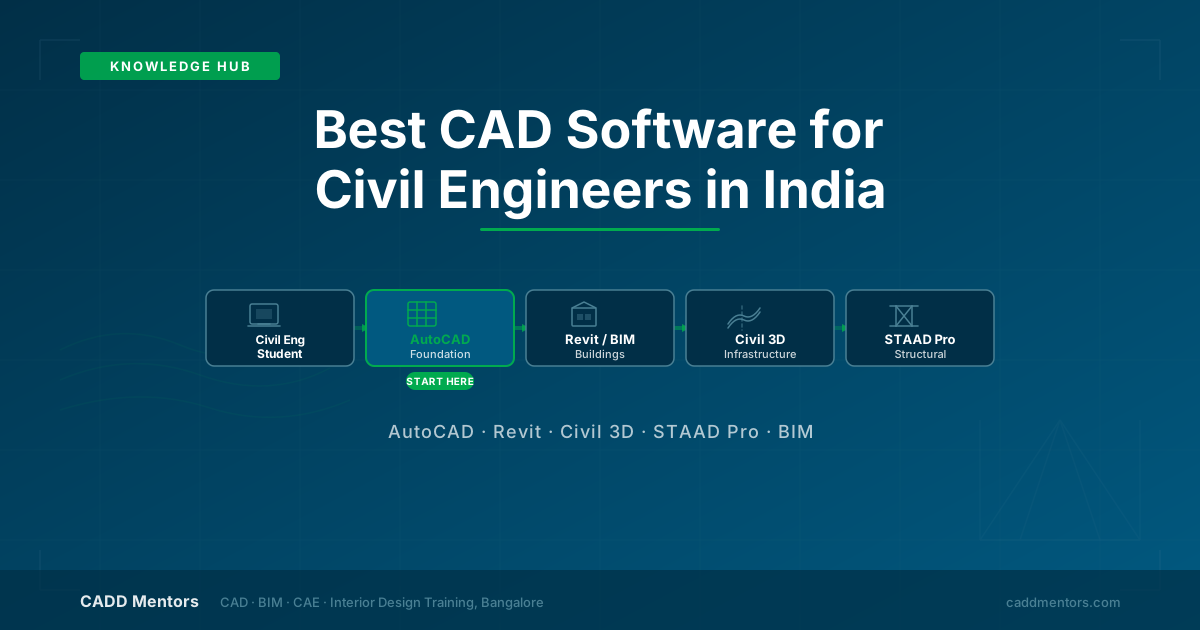
Civil engineering students in India are regularly confused by the range of CAD and design software they are expected to know. AutoCAD, Revit, Civil 3D, STAAD Pro, BIM - each comes up in job postings, college advice and training brochures. Should you learn all of them? Which comes first? Is it worth spending months learning a tool that may not be relevant to your career path?
This guide is a practical, honest answer to those questions. It is written for final-year civil engineering students, diploma holders preparing for their first job, and working professionals looking to upskill. The goal is to help you make a confident, informed decision - not to sell you a course.
The honest truth is that there is no single “best” software for civil engineers. The right choice depends entirely on what kind of work you want to do.
Quick Answer: Which CAD Software Should Civil Engineers Learn First?
If you need a fast, direct answer before reading further:
- Start with AutoCAD. It is the foundation of technical drawing for every civil and architectural discipline. Most employers expect it from fresh graduates as a baseline skill.
- Learn Revit if you want to work in architecture, building design, construction coordination or BIM.
- Learn Civil 3D if your focus is infrastructure - roads, highways, drainage, grading and land development.
- Learn STAAD Pro if structural analysis and design is your primary career direction.
- Learn BIM workflow if you want to work on modern building projects using coordinated, model-based delivery - it will open doors on larger construction projects.
Software Comparison: AutoCAD, Revit, Civil 3D, STAAD Pro and BIM
| Software | Best for | Who should learn it | CADD Mentors training |
|---|---|---|---|
| AutoCAD | 2D technical drafting, layouts, dimensions | All civil, architectural and mechanical learners | AutoCAD Training / Online |
| Revit Architecture | Building modelling, BIM documentation and coordination | Architecture, civil construction, BIM-track students | Revit Bangalore / Online |
| Civil 3D | Roads, surfaces, alignments, drainage, land development | Civil engineers on infrastructure and roads track | Civil 3D Bangalore / Online |
| STAAD Pro | Structural analysis, load modelling, frame design | Structural engineering track | STAAD Pro Training |
| BIM workflow | Coordinated building information models | Architecture, MEP, civil building design, BIM coordination | BIM Courses Online |
AutoCAD: The Essential Starting Point for Every Civil Engineer
AutoCAD is where every civil engineering CAD journey should begin. It is used for 2D floor plans, structural drawings, site layouts, contour maps, road cross-sections, drainage details and technical drawings of every kind - the outputs you will produce in your first years of work.
AutoCAD teaches you precision drawing, coordinate systems, layer management, drawing standards and the discipline of technical annotation. These are foundational skills that transfer directly to every other CAD and BIM tool you learn later.
In India, most job descriptions for civil engineering roles - at construction companies, design consultancies, infrastructure firms and project management offices - list AutoCAD as a required or preferred skill. Employers do not typically treat it as a specialist qualification; they expect it as a basic competency.
If you are in Bangalore, the AutoCAD Training course at CADD Mentors covers 2D drafting, editing, layers, dimensions, annotations and layout preparation with real drawing practice. If you are outside Bangalore, the AutoCAD Online Training Course delivers live instructor-led training remotely across India.
Revit and BIM: For Building Design, Architecture and Construction
Revit is the leading Building Information Modelling software for architecture, structural and MEP design in India. The key difference between AutoCAD and Revit is this: AutoCAD produces 2D drawings manually; Revit creates an intelligent 3D model of the entire building, from which floor plans, sections, elevations, schedules and quantities are generated automatically.
This matters because BIM is becoming mandatory on many government infrastructure and public building projects in India. Private developers, international EPC firms and large architecture practices are also adopting BIM-based workflows. Civil engineers and architects who understand Revit and BIM will be increasingly in demand on these projects.
For civil engineers interested in building construction - whether that is residential, commercial or institutional projects - the practical learning path is:
- Learn AutoCAD first (for drawing fundamentals and early job readiness)
- Then add Revit Architecture (for building modelling and BIM documentation)
CADD Mentors offers both classroom and online options for Revit training:
- Revit Architecture Training in Bangalore - classroom and hybrid sessions at the HSR Layout centre for local students
- Revit Architecture Course Online - live online BIM training available from anywhere in India
- BIM Courses Online - a structured Revit-based online BIM programme that covers the full building documentation workflow for learners across India
Civil 3D: For Infrastructure, Roads and Land Development
AutoCAD Civil 3D is the specialist software for civil infrastructure work. Unlike AutoCAD, which is general-purpose, Civil 3D is purpose-built for land and road design workflows - horizontal and vertical alignments, grading surfaces, earthwork calculations, drainage network design and land development documentation.
If your career is headed towards highways, road consultancies, NHAI contractor work, urban planning, water supply and drainage, or land development, Civil 3D is the most relevant tool to learn after AutoCAD. It is used by infrastructure design offices, state PWD departments and private EPC contractors on major road and drainage projects.
Civil 3D is not a beginner tool. Approach it after you are confident in AutoCAD basics.
CADD Mentors offers Civil 3D training both in Bangalore at the Civil 3D Training Course and as a live online programme at the Civil 3D Online Training Course for students outside Bangalore.
STAAD Pro: For Structural Analysis
STAAD Pro is not a general-purpose CAD drafting tool - it is structural analysis and design software. Civil and structural engineers use STAAD Pro to model structural frames, apply load combinations, analyse stresses and verify member sizes against IS codes and international design standards.
If you want to work as a structural engineer in design offices, high-rise building consultancies or large infrastructure firms, STAAD Pro is a genuinely useful skill. But it is most effective as a second qualification - learn AutoCAD first to build drawing and coordination fundamentals, then add STAAD Pro if structural analysis is specifically your area.
CADD Mentors offers STAAD Pro Training in Bangalore as a focused structural engineering course.
Recommended Learning Path for Civil Engineering Students
Here is a practical roadmap based on your career direction:
General civil engineering student - unsure of specialisation: AutoCAD -> observe what kind of work appeals (building vs. infrastructure vs. structure) -> add Revit, Civil 3D or STAAD Pro based on that answer
Architecture or building construction focus: AutoCAD -> Revit Architecture -> BIM workflow
Infrastructure, roads, highways or drainage focus: AutoCAD -> AutoCAD Civil 3D
Structural engineering focus: AutoCAD basics -> STAAD Pro
Online learner anywhere in India: AutoCAD Online -> Revit Online or Civil 3D Online -> BIM Online
The most important principle across all paths: start with AutoCAD. It is useful regardless of which specialisation you choose, and most employers expect it from civil engineering graduates entering the workforce.
Online vs Classroom: Which Is Right for You?
If you are in Bangalore or can attend in-person sessions at the HSR Layout centre, CADD Mentors offers both classroom-based and hybrid training options. Batch timings, fee details and in-person counselling are available by contacting the centre directly.
If you are studying or working in another city in India, live online training is available for AutoCAD, Revit Architecture, Civil 3D and BIM. All online courses are delivered by live instructors via screen-sharing sessions - not pre-recorded videos - with the same project practice as the classroom programmes.
Still Confused? Speak to a Counsellor
Choosing the right CAD course depends on your degree stream, career goal, current skill level and available time. If you are still unsure where to start, a CADD Mentors counsellor can help you map a learning path based on your background.
Browse by category: Civil CAD Courses / BIM Courses
Or contact us directly to speak with a counsellor before enrolling.