
Revit vs BIM: What Is the Difference and Which Should You Learn?
If you have searched “Revit vs BIM” and landed here, you probably encountered both terms in a job description or course brochure and are not sure what they mean or which one to learn. This guide explains both clearly, tells you how they are connected, and helps you choose the right course path.
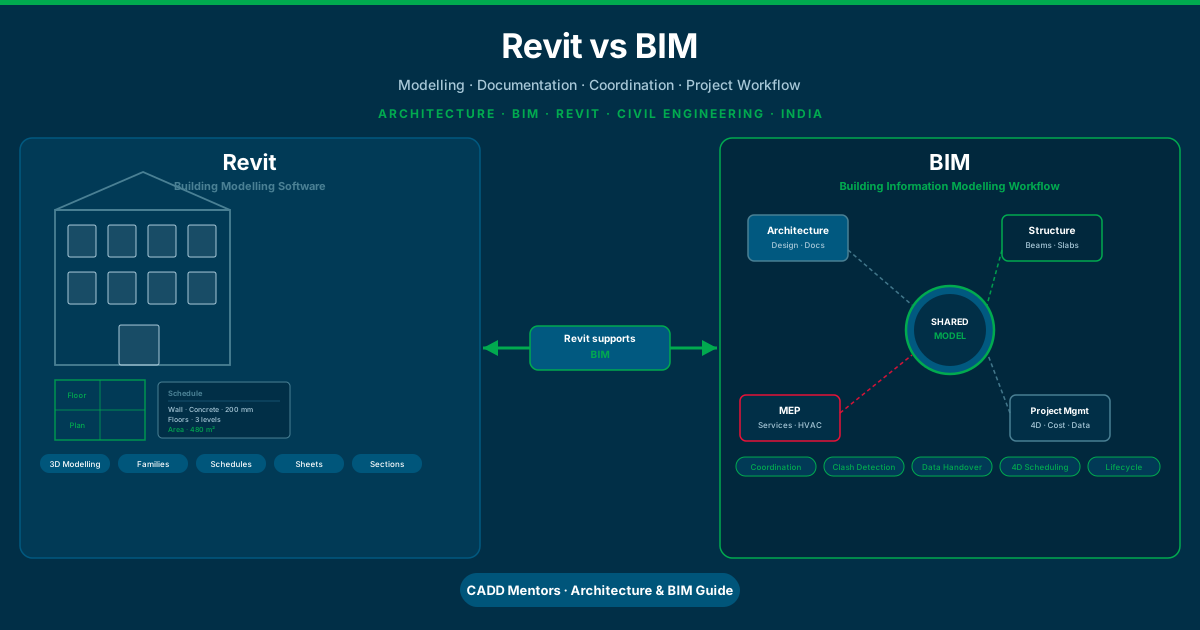
The short version: BIM is a process. Revit is a software. One is a way of working. The other is a tool you use to do that work. Once you understand this, everything else falls into place.
What Is BIM?
BIM stands for Building Information Modelling. It is not software. It is a methodology — a way of planning, designing, constructing, and managing a building or infrastructure project using coordinated digital information.
In traditional construction practice, an architect produces 2D floor plans, a structural engineer produces separate structural drawings, and MEP consultants produce yet another set of drawings. These are often developed independently and checked for clashes only at the construction stage. They do not share a common data source. When a wall gets moved, multiple drawing sets need to be updated manually. This leads to errors, delays, and cost overruns.
BIM changes this. Under a BIM approach:
- All disciplines — architecture, structure, MEP — work from a shared digital model
- The model contains not just geometry but intelligent data about every element
- Changes propagate automatically across all views and documents
- Clashes between structure and MEP can be detected digitally before anyone breaks ground
- The final model can be handed over to building operators for facility management
BIM is therefore a process, a set of standards, and a collaborative working methodology. It requires software to implement — but no single piece of software is “BIM” by itself.
What Is Revit?
Revit is a building modelling software made by Autodesk. It was originally developed by Revit Technology Corporation in 1997, acquired by Autodesk in 2002, and has since become one of the most widely used tools for BIM-based design and documentation.
Revit allows architects, structural engineers, and MEP engineers to build 3D parametric models of buildings. Every element in a Revit model is intelligent:
- A wall knows its material, fire rating, height, thickness, and how it connects to floors and ceilings
- A structural column knows its size, material, load, and position in the grid
- A window knows its dimensions, U-value, and glazing type
- A door knows its width, height, fire rating, and hardware specification
This intelligence can be extracted into schedules, used to generate bills of quantities, analysed for energy performance, exported for structural analysis, or handed to a facility management team after the building is complete.
Revit supports multiple disciplines in a single platform: architecture, structural engineering, and MEP (mechanical, electrical, plumbing). It is the most common entry point into BIM practice for students and professionals in India.
How Revit and BIM Relate to Each Other
The clearest way to understand the relationship is this:
Revit is one tool that enables you to practise BIM.
BIM is the goal. Revit is a means to reach that goal. You can think of it this way: if BIM were a construction process, then Revit would be one of the key pieces of machinery you use to execute it.
Other software also supports BIM:
| Software | Role in BIM |
|---|---|
| Revit | Authoring 3D building models (architecture, structure, MEP) |
| Navisworks | Coordinating models from multiple disciplines, clash detection |
| Civil 3D | Infrastructure and site modelling |
| ArchiCAD | Alternative to Revit for architectural BIM |
| Tekla Structures | Structural steel and precast concrete BIM |
| Synchro / MS Project | 4D scheduling linked to BIM models |
| CostX / Candy | BIM-based quantity takeoff and cost estimation |
Revit is the most important of these for most students to learn first, because it handles the core modelling and documentation work across all three major building disciplines. Navisworks and coordination tools come after.
What Can Revit Do That AutoCAD Cannot?
This question comes up a lot, especially for students and professionals who already know AutoCAD and are wondering whether to upgrade.
AutoCAD is a general-purpose computer-aided drafting tool. It creates 2D lines, arcs, and blocks. You can draw a floor plan in AutoCAD, but that floor plan is a set of lines — it has no knowledge of what it represents. A wall in AutoCAD is two parallel lines. Nothing more.
Revit models buildings as intelligent 3D objects. When you draw a wall in Revit, the software knows it is a wall — with a specific material, height, and connection logic. When you cut a section through a Revit model, Revit generates the section drawing automatically. When you change the height of a floor, every related section, elevation, and schedule updates. When you link a structural model with an architectural model, you can check whether any beams clash with any walls.
Here is a side-by-side look at the core differences:
| Feature | AutoCAD | Revit |
|---|---|---|
| Drawing type | 2D lines and blocks | 3D parametric objects |
| Data in elements | None — geometry only | Material, size, type, cost data |
| View generation | Manual — each view drawn separately | Automatic from one model |
| Schedule generation | Manual or external | Automatic from model data |
| Coordination | None — separate drawings | Linked models, clash detection |
| Change management | Manual updates across all drawings | Automatic propagation from model |
| BIM compatibility | No | Yes — designed for BIM workflows |
This does not mean AutoCAD is useless. For 2D site plans, layout drawings, civil infrastructure plans, and general drafting, AutoCAD remains extremely widely used. But for building design and BIM workflows, Revit is the appropriate tool.
For a detailed comparison of both tools, read our AutoCAD vs Revit guide.
Key BIM Concepts Every Revit User Should Know
Learning Revit alone is not enough to work on BIM projects. You also need to understand the core ideas that BIM practice is built on.
The Common Data Environment (CDE)
A CDE is the shared digital space where all project information is stored, managed, and shared between teams. Tools like Autodesk Construction Cloud or shared Revit Central Files act as a CDE. Everyone working on the project — architects, engineers, clients — accesses models and documents from the same source.
LOD — Level of Development
LOD describes how detailed a BIM model element is at a given stage. LOD 100 is a basic placeholder. LOD 200 is approximate geometry. LOD 300 is accurate enough for coordination. LOD 400 is fabrication-ready. LOD 500 is as-built. When firms talk about BIM deliverables, they often specify the required LOD.
Clash Detection
Clash detection is the process of automatically identifying conflicts between elements from different disciplines. For example, a structural beam may pass through the same space as a duct from the MEP model. In traditional 2D workflows, this clash would only be discovered on site. In BIM, it is found in the model before construction begins — using tools like Navisworks.
4D BIM
4D BIM adds time to the 3D model. Each element in the model is linked to a project schedule, so you can see a simulation of construction sequencing. This helps project managers understand logistics and communicate the construction plan to clients.
5D BIM
5D BIM adds cost. Each element carries a cost value, so the model can generate automatic quantity takeoffs and cost estimates. As the design changes, the cost estimate updates automatically.
ISO 19650
ISO 19650 is the international standard for managing information over the whole life cycle of a built asset using BIM. It defines how information should be structured, named, shared, and handed over. Large projects and government contracts increasingly specify compliance with ISO 19650.
Who Uses Revit and BIM in India?
BIM adoption in India has accelerated significantly over recent years. The sectors driving this growth include:
Architecture and Urban Development: Large residential and commercial projects from developers in cities like Bengaluru, Mumbai, Hyderabad, Pune, and Delhi NCR increasingly require BIM-based design coordination. Architecture firms that work with international clients or handle large mixed-use projects are mostly BIM-based.
Infrastructure: Metro rail projects, airport construction, and national highway infrastructure have begun specifying BIM requirements. Civil 3D and Revit are used together on infrastructure BIM projects.
Hospitals and Campuses: Complex buildings with intensive MEP requirements — hospitals, data centres, campuses — almost always use BIM for MEP coordination. Clashes between HVAC ducts and structural elements are extremely costly if not caught in the model first.
EPC and Construction Management: Large engineering, procurement, and construction firms work across architecture, structure, and MEP simultaneously. BIM coordination using Navisworks is standard practice on projects above a certain scale.
Government Projects: Several state governments and central bodies have issued BIM mandates or guidelines for public construction. This policy direction is pushing firms to hire BIM-capable engineers and architects.
For students and working professionals, this means that BIM skills — starting with Revit — are increasingly the baseline expectation for design and coordination roles, not an optional extra.
Revit for Architects vs Civil and Structural Engineers
Revit is used differently depending on your discipline.
Revit for Architects
Architects use Revit to create the full architectural model of a building — walls, floors, roofs, ceilings, doors, windows, stairs, and ramps. From this model they generate floor plans at every level, reflected ceiling plans, roof plans, building sections and wall sections, interior and exterior elevations, door and window schedules, room schedules and area calculations, and complete sheet sets for construction documentation.
Architects also use Revit to coordinate with structural and MEP consultants by linking their models and checking for spatial conflicts.
Revit for Civil and Structural Engineers
Structural engineers use Revit to model columns, beams, bracing frames, concrete slabs, foundations, retaining walls, rebar, and connections. From the structural Revit model they generate structural general arrangement drawings, reinforcement drawings, and schedules. The structural Revit model can also be exported to analysis software like STAAD Pro or ETABS for load analysis, then imported back after analysis to update the model.
Civil engineers working on sites and infrastructure typically use Civil 3D for site elements, but use Revit for building elements on projects that include structures.
BIM Levels: What Do They Mean?
You may encounter the term “BIM levels” in job descriptions or project briefs, particularly from UK-influenced firms or on international projects.
BIM Level 0: No collaboration, paper-based or simple CAD. No shared data.
BIM Level 1: Managed 2D or 3D CAD, using shared standards. No real-time model collaboration.
BIM Level 2: Each discipline produces its own BIM model. Models are federated and coordinated in a CDE. This is the current industry baseline in the UK and is widely adopted in India for large projects.
BIM Level 3 (iBIM): A fully integrated model shared in real time across all disciplines and stakeholders, including contractors and owners. This is the long-term direction of the industry.
Most firms in India are currently moving from Level 1 to Level 2. Being able to produce and coordinate a Revit model at Level 2 is what most BIM job roles require right now.
The BIM Workflow on a Real Project
Understanding the workflow helps you see where Revit sits in relation to the wider process.
Stage 1 — Design Brief and Concept: The architect produces concept sketches and begins building a Revit massing model. The BIM Execution Plan (BEP) is agreed between all parties.
Stage 2 — Detailed Design: The architectural Revit model is developed with full element detail. The structural engineer builds a linked structural Revit model. MEP consultants model duct runs, pipe routes, and electrical layouts.
Stage 3 — Coordination: All discipline models are combined in Navisworks. Clashes are identified, reviewed, and resolved. The CDE tracks who is responsible for each clash resolution.
Stage 4 — Construction Documentation: Revit generates coordinated drawing sets — architectural plans, structural drawings, MEP layouts. Schedules are extracted. Bills of quantities are produced.
Stage 5 — Construction: Contractors may use the Revit model or an IFC export from it for on-site coordination. Some projects use the model for 4D construction sequencing simulations.
Stage 6 — Handover and Facility Management: The as-built BIM model is handed to the building owner or operator. It contains information about materials, equipment, warranties, and maintenance schedules that the facilities team needs to manage the building over its lifetime.
Do You Need to Learn Both Revit and BIM Theory?
In practice, you learn both together, but Revit comes first. If you enrol in a good Revit training programme, you will spend most of your time building models — walls, floors, roofs, structural frames, MEP systems. This practical skill is what employers want first. You will also learn about views, families, collaboration, linked models, and sheets — and through this you absorb how BIM thinking works.
BIM theory — LOD, CDEs, ISO 19650, 4D and 5D concepts — becomes relevant once you are working on real projects or preparing for senior coordination roles. You do not need to memorise standards before you can start using Revit productively.
The right mindset is: learn Revit as your technical skill, understand BIM as your working philosophy.
Revit vs Other BIM Tools
Revit vs ArchiCAD
ArchiCAD is a competing BIM platform made by Graphisoft. Both Revit and ArchiCAD can produce full BIM models for architecture. Revit has a larger market share in India and is the dominant choice among firms working with international clients. For students in India choosing between the two, Revit is the stronger choice based on job market demand.
Revit vs Tekla Structures
Tekla Structures is a highly specialised structural BIM tool made by Trimble. It is most commonly used for complex steel structures, precast concrete, and heavy civil engineering. Revit handles structural work at a general level. Tekla handles structural detailing at a much deeper level of precision for fabrication. For general civil and structural BIM, Revit is the right starting point.
Revit vs Civil 3D
Civil 3D is Autodesk’s BIM solution for civil infrastructure — roads, drainage, grading, land development. It is not a building modelling tool. Revit and Civil 3D are often used together on infrastructure projects that include both site work and structures. Civil engineers working on buildings use Revit. Civil engineers working on roads and drainage use Civil 3D. Many engineers learn both.
Revit Architecture, Structure, and MEP — Which Should You Start With?
When people say “learn Revit”, they usually mean Revit Architecture. This is because the architectural model is the base model from which structural and MEP work flows. Revit Architecture covers the most content and is the most widely required.
Start with Revit Architecture if you are: an architecture student, a civil engineering student interested in building design, a draughtsman or designer wanting to upgrade from AutoCAD, or a working professional in a design firm.
Start with Revit Structure if you are: a structural engineer, a civil engineer focused on structural analysis and detailing, or a professional working in an EPC firm on building structures.
Add Revit MEP later if you are: working in an MEP consultancy, a services engineer, or a BIM coordinator handling clash detection between building services and structure.
A course in Revit Architecture will still teach you enough of how the software works to navigate the structural and MEP environments when you need to. The fundamentals — families, views, sheets, linked models — are the same across all disciplines.
What About STAAD Pro and Structural Analysis?
Revit and STAAD Pro serve different purposes and are often used together, not instead of each other.
STAAD Pro is a structural analysis and design software. You use it to calculate loads, stresses, deflections, and verify that a structural design is safe and compliant with design codes. It produces calculation reports and optimises member sizes.
Revit Structure is a building information modelling tool. You use it to produce the coordinated 3D structural model, generate structural drawings, and link to the architectural model.
In a typical workflow, a structural engineer might start in STAAD Pro to analyse and size the structure, then model the confirmed design in Revit Structure to produce coordinated drawings. Some tools allow direct export and import between the two. For civil engineering students interested in buildings, learning STAAD Pro alongside Revit is a strong combination.
Choosing Your Course Path
The right course path depends on where you are starting from and where you want to go.
If you are a fresh architecture student, start with AutoCAD for 2D drafting fundamentals, then move to Revit Architecture. Add 3D visualisation tools like 3ds Max or Lumion as a third step. BIM coordination tools come later when you are working on real projects.
If you are a civil or structural engineering student, start with AutoCAD, then choose between Revit Structure and STAAD Pro depending on whether your focus is documentation or analysis. Civil 3D is valuable for infrastructure work.
If you are a working professional who already knows AutoCAD, Revit is the natural next step. Most experienced AutoCAD users can adapt to the Revit environment within a few weeks of focused training, even though the approach is fundamentally different.
If you want to learn online from anywhere in India, CADD Mentors offers live, instructor-led Revit and BIM courses online. These are not pre-recorded videos — you join scheduled batches with a live instructor and have access to project files and feedback.
Visit our online courses page to see the full Architecture and BIM roadmap, or explore the learning paths below for a structured route through the available courses.
Conclusion
The confusion between Revit and BIM is extremely common — and completely understandable. BIM is used as both a methodology and as shorthand for “BIM tools”, which is why people ask “should I learn Revit or BIM?” as if they are alternatives.
They are not alternatives. BIM is the destination. Revit is one of the most important vehicles for getting there.
For anyone in architecture, civil engineering, or structural engineering in India today, learning Revit is the most direct way to enter BIM practice. It is widely used, actively in demand in the job market, and a solid foundation for expanding into coordination tools, project management, and advanced BIM workflows.
Start with Revit. Build real projects. Understand what the model contains and why. The BIM framework becomes clear as you work.
To explore your options, see the Revit Architecture training course in Bangalore, the Revit Architecture online course, and the BIM courses online. For the related guide on AutoCAD vs Revit, read our AutoCAD vs Revit comparison.
Civil CAD Learning Paths
Choose the path that matches your background and career direction.
Architecture Student Path
Best for: B.Arch and interior design students
Civil / Structural Engineering Student Path
Best for: B.E. / B.Tech Civil graduates
Working Professional — Upgrade Path
Best for: AutoCAD users wanting to move into BIM
Online Learner Path
Best for: Students anywhere in India
BIM Coordinator Path
Best for: Experienced professionals moving into BIM management