
NX CAD Online Course with Live Instructor-Led Training
Learn Siemens NX online through live instructor-led training covering part modelling, surface design, assembly and drafting, with guided practice and mentor support.
Course Details
NX CAD Online Course
Duration
60 Hours
Mode
Online
Software
Siemens NX, NX CAD + more
Eligibility
Engineering / Design students · Professionals
Certificate
Included on completion
Delivery
Live Online India
About This Course
NX CAD Online Course at CADD Mentors helps mechanical and product-design learners build practical Siemens NX skills through live, mentor-led online sessions, guided software practice and project-style exercises. It is a live instructor-led programme for engineering students and working professionals anywhere in India — you learn NX part modelling, surface design, assembly management and drafting over video conferencing, with no need to travel to Bangalore.
Rather than watching pre-recorded videos alone, you follow the instructor’s screen-share on your own NX installation, practise each tool during the session, and get your models reviewed and your doubts cleared live. If you prefer in-person classroom learning, a separate NX CAD Training in Bangalore course is available at our HSR Layout centre.
What the online NX CAD course covers
The course follows the Siemens NX mechanical design workflow used in automotive, aerospace, electronics and industrial machinery: sketch-based and synchronous part modelling, advanced surface design, assembly design with Wave linking and interference checks, and drawing production with GD&T. A short overview of NX CAM (CNC machining concepts) is included for context. Course modules may vary according to the selected batch and learner level.
How live online NX CAD training works
Every topic is taught live. The instructor demonstrates each NX tool through screen-share while you replicate the steps on your own machine, so you are building models from the first session rather than only watching. Guided exercises run during the class, your assignments and models are reviewed in live sessions, and you can ask questions and get doubts clarified as you work. Onboarding, batch communication and counselling are handled remotely — reach our team on WhatsApp or through the enquiry form to get started.
For session recordings, revision material or any downloadable resources, please confirm what is available for your batch with our team before enrolment.
Prerequisites
No prior NX experience is required — the course begins with the interface and sketching fundamentals. Basic familiarity with engineering drawings or mechanical components is helpful but not mandatory. A willingness to practise between sessions is the most important requirement.
System and software requirements
NX is a high-end Windows CAD application with significant hardware demands, and the exact requirements change between releases. As a general guide you will need a capable Windows computer with sufficient RAM and graphics capability to run NX smoothly, a stable internet connection, and access to a compatible NX installation. Because software versions and licensing options vary, please confirm current software and system requirements before enrolment with our team.
Batch schedule and duration
The course is structured around approximately 60 hours of guided live instruction. Exact batch length, timing and pace depend on the schedule and learner level. Contact us for the current batch duration and schedule, including available morning, evening or weekend options.
Mentor and doubt-support
Sessions are led by an NX instructor who demonstrates, guides your practice, and reviews your work live. You can raise questions during sessions, and batch-level support is available between classes through our counselling and WhatsApp channels. Confirm the current support process for your batch when you enrol.
Certification
On successfully completing the course you receive a CADD Mentors Certificate of Completion. CADD Mentors is an independent training provider and is not an official Siemens or NX authorised training centre. The certificate recognises completion of the CADD Mentors NX CAD programme.
Career applications
Siemens NX is an enterprise CAD/CAM/CAE standard in automotive, aerospace, electronics and industrial machinery, where part-to-manufacturing data and large assemblies matter. Online NX skills support roles such as mechanical design engineer, CAD/CAM engineer and tooling design engineer. For a wider view of mechanical software and roles, see the CAD career roadmap for mechanical engineers and how tools are evolving in AI in the CAD industry.
Suggested NX CAD learning path
A common path is to build a parametric modelling foundation first, then specialise in NX for enterprise CAD/CAM environments. Many learners start with SolidWorks, then move into NX or CATIA, and add simulation later. To compare the main mechanical tools before deciding, read SolidWorks vs CATIA vs NX. You can also explore the full Mechanical CAD courses discipline guide and all online courses at CADD Mentors — including the CATIA online course and the SolidWorks online training course.
Online vs Bangalore classroom
This page is the online NX CAD course, delivered live to learners across India. If you are based in Bangalore and prefer in-person classes at our HSR Layout centre, the NX CAD Training in Bangalore course covers the same core NX topics in a classroom format. The two courses are separate — choose the delivery mode that suits you.
Best suited for:
Curriculum
What You Will Learn in NX CAD Online Course
NX interface, resource bar, part navigator and document management
Sketch tools, sketch constraints and fully defined sketches in NX
Feature-based modelling: extrude, revolve, sweep, loft and boolean operations
Synchronous modelling: direct face edits without feature-tree dependency
Expressions and parametric relationships for design-driven geometry
Surface creation: through curves, through curve mesh, ruled and studio surface
Surface editing: extend, trim, sew, offset and surface-quality checks
Assembly constraints, Wave geometry linking and interference analysis
NX drafting: drawing views, GD&T, section and detail views
NX CAM overview: milling operations, toolpath concept and post-processing
Course Structure
NX CAD Online Course — Syllabus Modules
Module 1 – NX Interface and Fundamentals
Gateway, modelling and sketching environments, part files and assemblies, navigation and selection — demonstrated live online through instructor screen-share so you follow each step on your own installation.
Module 2 – Parametric Part Modelling
Sketch-based features for mechanical components (shafts, brackets, housings), practised live with guided exercises.
Module 3 – Advanced Modelling
Expressions, reuse, patterns, mirrors, multi-body parts and synchronous modelling techniques for editable designs.
Module 4 – Surface Design
Curve design, advanced surface creation and editing, and hybrid modelling for complex geometry. (Advanced module — depth may vary by batch and learner level.)
Module 5 – Assembly Design
Assembly constraints and motion, top-down design with Wave linking, interference checks and BOM generation, with models reviewed live by the instructor.
Module 6 – NX Drafting
Producing engineering drawings from 3D models with annotations, tolerances and a printing-ready workflow.
Module 7 – NX CAM Overview
CNC machining concepts, the NX CAM interface, tool creation and a guided milling walkthrough. (Overview module — not a full CAM course.)
Module 8 – Guided Online Project and Review
An applied exercise — model a mechanical component or sub-assembly and produce drawings — submitted and reviewed in a live online session. Module coverage may vary according to the selected batch and learner level.
Not sure if this course is right for you?
Talk to a counsellor before you enrol - no commitment required.
Hands-On Learning
Course Project Examples
These are example project tasks you will practise during the training. Visuals are illustrative — they represent the type of work covered, not actual student output.
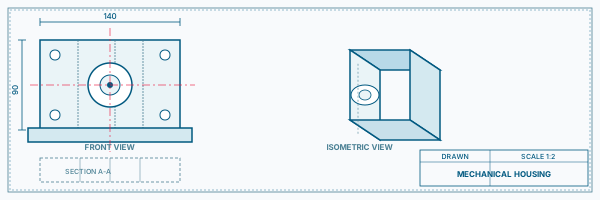
Mechanical Housing Model (illustrative)
Mechanical CADMechanical Housing Model (illustrative)
An illustrative practice exercise: model a housing with ribs, bosses, draft angles and thin-wall sections using NX parametric features, guided live online.
Mechanical CAD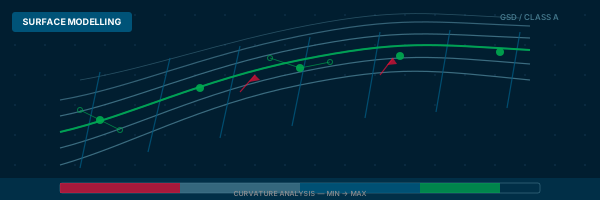
Surface Modelling Exercise (illustrative)
Mechanical CADSurface Modelling Exercise (illustrative)
An illustrative exercise creating a curved panel surface with NX Studio Surface tools, converting to a solid shell and checking surface quality.
Mechanical CAD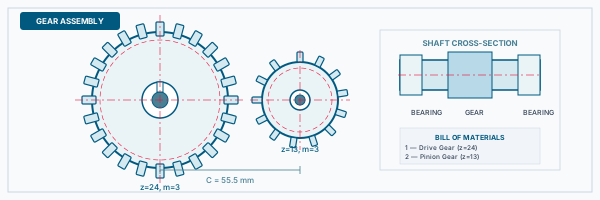
Sub-Assembly Workflow (illustrative)
Mechanical CADSub-Assembly Workflow (illustrative)
An illustrative exercise assembling several mechanical parts with NX constraints and checking for interference, reviewed by the instructor.
Mechanical CAD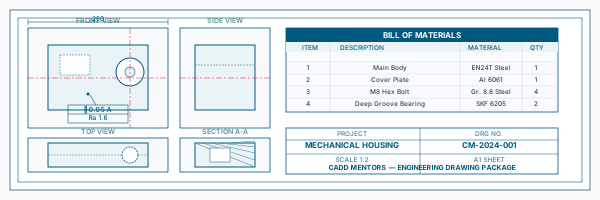
Manufacturing Drawing Set (illustrative)
Mechanical CADManufacturing Drawing Set (illustrative)
An illustrative drafting exercise producing a drawing set with views, sections, GD&T annotations and a BOM from an NX assembly.
Mechanical CADIs This Course for You?
Who Should Join NX CAD Online Course?
Mechanical and automobile engineering students anywhere in India who want live online NX CAD training
Students targeting automotive, aerospace or electronics manufacturers that use Siemens NX
Working professionals at companies standardised on Siemens PLM tools
CAD professionals transitioning from another platform to NX
Learners in cities where local NX CAD classroom training is limited or unavailable
After the Course
Career Opportunities After NX CAD Online Course
These are roles and sectors where this software skill is typically valued. Job outcomes depend on your background, portfolio and other factors.
Mechanical design engineer at automotive OEMs or tier suppliers using NX
CAD and CAM engineer in aerospace or defence manufacturing
Product design engineer in electronics or industrial machinery companies
Tooling and fixture design engineer using NX
NX PLM support and data-management roles
CNC programmer combining NX CAM with design skills
Training Delivery
Live Online Training Across India
Online Training - Live Instructor-Led, Pan India
This course is delivered through live online sessions for students across India. Students attend from their own machine, practise during the session and receive instructor support online.
Related Courses
ANSYS Mechanical Training
Mechanical CAD Courses Online
CATIA Online Course
NX CAD Training
SolidWorks Online Training Course
Software Resources
Official Software References
These links point to official software and product pages that can help learners understand the tools covered in this course.
Software names and product names are trademarks of their respective owners. CADD Mentors is an independent training provider and is not affiliated with or endorsed by these companies.
Support
Frequently Asked Questions - NX CAD Online Course
What is the NX CAD online course?
Is this NX CAD course conducted fully online?
Who should learn NX CAD?
What topics does the online NX CAD course cover?
Do I need prior CAD experience to join?
What system and software setup do I need?
Is there a Bangalore classroom option for NX CAD?
How is NX CAD different from CATIA or SolidWorks?
How do I request the current batch schedule and duration?
Start Your CAD Learning Journey with CADD Mentors
Speak with our counsellor, choose the right course for your goal and attend a free demo before joining.