
CAD Career Roadmap for Civil Engineers: What to Learn After AutoCAD
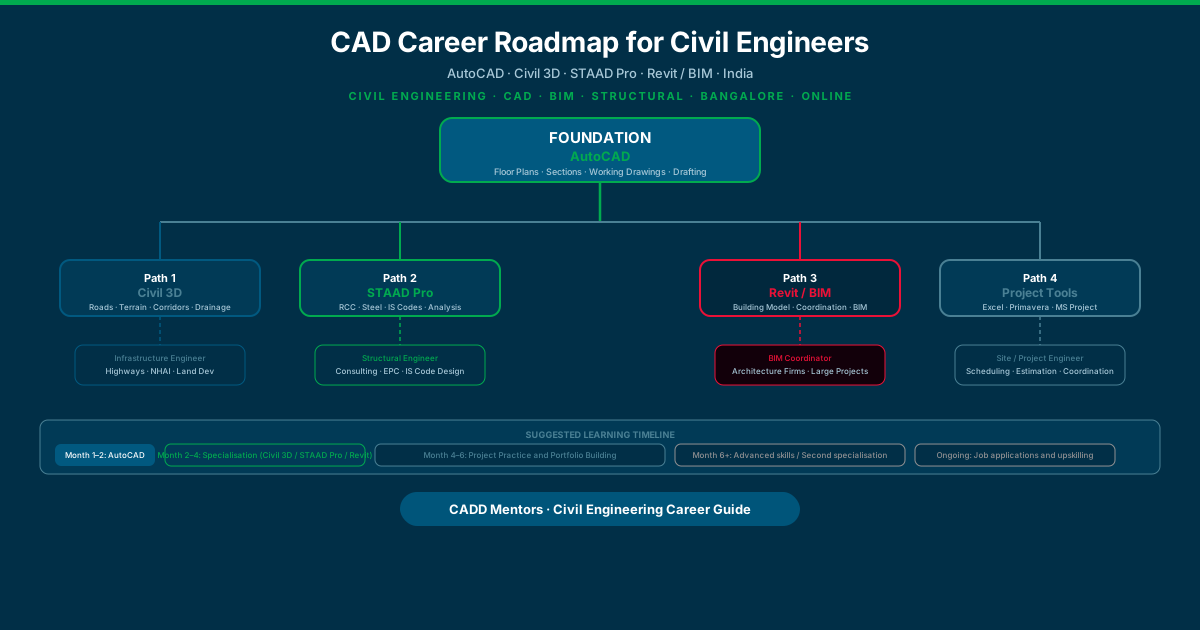
Civil engineering graduates in India face a confusing software landscape. AutoCAD, Civil 3D, STAAD Pro, Revit, ETABS, Primavera, Navisworks — all appear in job descriptions. Training institutes offer all of them. Without a clear understanding of what each tool actually does and who it is for, students end up learning software that does not match their intended career direction.
This guide gives you a practical, role-based roadmap. It tells you what to learn, in what order, and why — based on whether your civil engineering career is heading towards infrastructure design, structural engineering, building and BIM coordination, or site and project management.
Quick answer: Start with AutoCAD. It is the universal foundation for all civil CAD work. After AutoCAD, choose one specialisation path based on your target role: Civil 3D for infrastructure and roads, STAAD Pro for structural analysis and design, Revit and BIM for building coordination, or project management tools for site and planning roles. Do not try to learn everything at once.
Why Random Software Learning Wastes Time
Many civil engineering students make the same mistake: they try to learn every tool they see in job descriptions, starting with whichever one is offered at the nearest institute, regardless of whether it matches their interests.
The result is shallow knowledge in several tools and real competence in none of them. An employer looking for a Civil 3D draughtsman wants someone who can run corridors, generate earthwork reports, and produce coordinated drawings — not someone who spent two weeks on Civil 3D alongside six other tools.
The career roadmap approach is different. You build depth in one specialisation at a time, in a logical sequence, and you practise with real project-type work between each stage. This produces a portfolio that demonstrates actual capability — which is what gets you shortlisted.
The Civil Engineering CAD Landscape
Before choosing a path, it helps to see how the major civil engineering tools relate to each other.
| Stage | Tool | What It Does | Target Role |
|---|---|---|---|
| Foundation | AutoCAD | 2D drafting, plans, sections, documentation | All civil roles |
| Infrastructure | Civil 3D | Road design, terrain, corridors, drainage | Highway, land dev, infrastructure |
| Structural | STAAD Pro | RCC/steel analysis, IS code design | Structural consultant, EPC |
| Building / BIM | Revit | BIM modelling, coordination, quantity | BIM coordinator, architecture firms |
| Project / Site | Primavera / MS Project | Scheduling, planning, progress tracking | Site engineer, project manager |
| Supporting | ETABS | Multi-storey RCC building analysis | Structural specialists (high-rise) |
| Supporting | Navisworks | BIM clash detection, coordination | BIM coordinator (add-on to Revit) |
| Supporting | Excel | Estimation, quantity take-off, reporting | All roles |
The tools at the foundation and specialisation stages are the ones to focus on first. Supporting tools can be added as your career develops.
Stage 1: The Foundation — AutoCAD for Civil Engineers
AutoCAD is not optional. It is the baseline drawing environment for civil engineering documentation, and it is the platform on which Civil 3D is built. Whether you end up specialising in roads, structural engineering, or BIM, you will use AutoCAD for 2D drawing work throughout your career.
What civil engineers use AutoCAD for:
- Site layout plans — plotting the positions of buildings, roads, utilities, and boundaries on a site
- Floor plans and structural layout drawings — grid lines, column positions, slab outlines
- Cross-sections — cutting through terrain, roads, or buildings to show internal conditions
- Elevation drawings — showing the vertical face of a structure
- Reinforcement drawings — bar bending schedules and rebar placement layouts
- Road plan drawings — centreline layout, lane markings, kerb alignments
- Working drawings for contractors — detailed construction documentation
What AutoCAD does not do:
AutoCAD does not design roads intelligently (Civil 3D does that). It does not perform structural calculations (STAAD Pro does that). It does not build BIM models (Revit does that). It is a precision drafting tool, not a design analysis engine.
How long AutoCAD takes to learn: A focused course covering 2D civil drafting, layers, blocks, annotations, dimensions, layouts, and plotting takes 40 to 60 hours over 6 to 8 weeks for most beginners.
CADD Mentors offers AutoCAD Training in Bangalore at our HSR Layout centre and AutoCAD Online Training for students and professionals across India.
Specialisation Path 1: Infrastructure and Road Design
Choose this path if: You are interested in roads, highways, site grading, drainage, land subdivision, or infrastructure project work. If your final-year project involved a road design, a drainage study, or a site layout, this path aligns with that direction.
The core tool: Civil 3D
Civil 3D is Autodesk’s civil infrastructure design software, built on the AutoCAD platform. It adds intelligent design objects — alignments, profiles, corridors, surfaces, pipe networks — that AutoCAD alone cannot create.
What Civil 3D adds after AutoCAD:
- Alignments — the horizontal geometry of a road or canal, defined with tangents, curves, and spirals
- Profiles — the vertical geometry along an alignment, showing existing and proposed grades
- Corridors — the full 3D model of a road, combining alignment, profile, and a cross-section assembly
- Surfaces — digital terrain models (DTMs) created from survey points, used for earthwork calculations
- Pipe networks — gravity drainage and pressure pipe systems with invert levels and hydraulic data
- Grading — shaping land to achieve design levels and drainage patterns
From these elements, Civil 3D generates coordinated drawings, quantity reports, earthwork volumes, and material schedules automatically.
Job roles this path leads to: Highway design engineer, infrastructure project engineer, land development designer, survey and mapping draughtsman, site designer at urban infrastructure firms, roles on NHAI and state highway projects.
For the detailed comparison of what Civil 3D does versus AutoCAD, see the AutoCAD vs Civil 3D guide.
CADD Mentors offers Civil 3D Training in Bangalore at our HSR Layout centre and Civil 3D Online Training for India-wide learners.
Specialisation Path 2: Structural Design and Analysis
Choose this path if: You are interested in designing building frames, bridges, industrial structures, or any structure that carries loads. If your civil engineering coursework in structural mechanics, RCC design, or steel design was your strongest subject, this path suits you.
The core tool: STAAD Pro
STAAD Pro is Bentley Systems’ structural analysis and design software, used across India for RCC and steel structure design to Indian Standard codes.
What STAAD Pro adds after AutoCAD:
- Structural modelling — building a 3D stick model of a frame with nodes, beams, columns, plates, and supports
- Load definitions — applying dead loads, live loads, wind loads (IS 875), seismic loads (IS 1893), and load combinations
- Static analysis — computing bending moments, shear forces, axial forces, deflections, and reactions at every member and node
- RCC design — checking beams and columns against IS 456, calculating required reinforcement
- Steel design — checking steel members against IS 800, verifying slenderness and combined stress ratios
- Foundation design — sizing isolated footings, combined footings, and raft foundations
The structural model does not produce drawings directly — AutoCAD or Revit is still used for drawing production. STAAD Pro produces the engineering calculations that determine what dimensions and reinforcement are needed.
Optional add-on: ETABS
ETABS (by CSI) is a structural analysis tool specialised for multi-storey building frames, particularly high-rise reinforced concrete buildings. STAAD Pro handles a wider range of structure types; ETABS goes deeper on multi-storey building dynamics and lateral load behaviour. Many structural engineers learn both. STAAD Pro is the stronger starting point for generalist structural work.
Job roles this path leads to: Structural engineer at a consulting firm, structural design engineer at a real-estate developer, structural analyst at an EPC contractor, junior structural engineer at a government infrastructure body.
For the detailed comparison of Civil 3D and STAAD Pro, see the Civil 3D vs STAAD Pro guide.
CADD Mentors offers STAAD Pro Training in Bangalore.
Specialisation Path 3: Building Design and BIM Coordination
Choose this path if: You are interested in building construction coordination, architecture-led project work, quantity management, or BIM management. If you have an interest in how buildings are designed and coordinated across disciplines — architecture, structure, MEP — this path develops those skills.
The core tool: Revit
Revit is Autodesk’s BIM platform. Civil engineers who use Revit typically focus on Revit Structure — modelling the structural frame of a building in coordination with the architectural and MEP models.
What Revit adds after AutoCAD:
- 3D structural modelling — columns, beams, slabs, walls, and foundations as intelligent objects that know their material, size, and structural role
- Coordinated drawing production — structural plans, elevations, sections, and details generated from the same model, always in sync
- Structural schedules — automatic schedules of columns, beams, and slabs with dimensions, materials, and quantities
- Multi-discipline coordination — linking the structural Revit model with the architectural and MEP models to detect clashes and coordinate the full building
- BIM data — the model carries data that can be extracted for quantity take-off, cost estimation, and facility management
After Revit, the natural extension for BIM coordination is Navisworks — Autodesk’s tool for combining models from multiple disciplines and running clash detection. Together, Revit and Navisworks form the core of a BIM coordinator’s toolkit.
For a detailed explanation of how Revit relates to BIM, see the Revit vs BIM guide.
Job roles this path leads to: BIM coordinator, BIM modeller, structural BIM engineer, design coordination engineer at architecture or engineering firms, BIM consultant.
CADD Mentors offers Revit Architecture Training in Bangalore and BIM Courses Online.
Specialisation Path 4: Site Engineering and Project Coordination
Choose this path if: Your interest is in construction site management, project planning, progress monitoring, and coordination rather than technical design. Site engineers, project coordinators, and planning engineers use a different toolkit from design engineers.
The tools for this path:
- AutoCAD remains useful for reading drawings and making site markup drawings
- Excel is the most widely used tool in site and project coordination — estimation sheets, progress reports, material take-offs, and budget tracking
- Microsoft Project for creating Gantt charts, work breakdown structures, and tracking project schedules on small to mid-size projects
- Primavera P6 for complex, multi-activity construction scheduling on large infrastructure or EPC projects — the industry standard for project planning on major civil works
This path does not require Civil 3D, STAAD Pro, or Revit as core tools. The priority is operational efficiency, site documentation, and schedule management.
Job roles this path leads to: Site engineer, junior project manager, planning engineer, construction coordinator, quantity surveyor (with estimation skills added).
Student-Wise Roadmap
Diploma Civil Engineering Student
You are entering the industry from a diploma programme. Employers in this track typically look for drafting and basic site skills rather than advanced design tools.
Recommended path:
- AutoCAD (mandatory — 6 to 8 weeks)
- Civil 3D basics (if infrastructure) or STAAD Pro basics (if structural) — choose one
- Build two or three project drawings as portfolio pieces
- Excel for site documentation and quantity sheets
B.E. / B.Tech Civil Engineering Graduate
You have a full engineering foundation. Employers expect theoretical depth alongside software skill.
Recommended path:
- AutoCAD (4 to 6 weeks if you have not already learned it)
- Choose your specialisation based on your final-year project and interests:
- Roads and infrastructure → Civil 3D
- Structural engineering → STAAD Pro
- Building coordination → Revit
- Spend 2 to 3 months on your chosen specialisation tool with project practice
- Begin job applications with your portfolio in hand
Fresh Civil Engineering Graduate (No CAD Training Yet)
Do not apply for technical roles without at least AutoCAD. The skill gap is immediately visible in any technical interview or drawing exercise.
Recommended path:
- AutoCAD first — 6 to 8 weeks
- Civil 3D or STAAD Pro next — 8 to 12 weeks
- Build project portfolio during and after training
- Apply for junior draughtsman, CAD technician, or junior engineer roles
Working Site Engineer
You are already working on site but want to move into a design or office role.
Recommended path:
- AutoCAD — you may have some exposure; a short refresher course may be enough
- STAAD Pro if your site work has been structural and you understand load paths
- Civil 3D if your site work has been roads or site development
- Add Revit if you are targeting larger firms with BIM workflows
The advantage you have over freshers is real project exposure. Use that context when explaining your work in interviews — it signals genuine understanding, not just software clicks.
Working Professional — Shifting from Non-Design Role to CAD/Design
You may be in a quantity surveying, procurement, or site administration role and want to move into technical design work.
Recommended path:
- AutoCAD — start from basics, allow 8 to 10 weeks for a thorough foundation
- Choose a specialisation based on the design roles you are targeting
- Complete at least one full project in your specialisation tool as a portfolio piece
- Be realistic about the transition timeline — shifting from non-design to design roles typically takes 6 to 12 months of consistent effort
Online Learner (Outside Bangalore)
Civil engineering students and professionals in cities other than Bangalore have full access to live, instructor-led online training at CADD Mentors. Online batches run in real time with a live instructor — not pre-recorded videos.
Available online: AutoCAD Online Training, Civil 3D Online Training, BIM Courses Online.
For STAAD Pro, Revit Architecture, and other tools, classroom training at our Bangalore HSR Layout centre is available for those who can attend in person.
Which Civil CAD Path Should You Choose?
Use this decision guide if you are still unsure after reading the path descriptions above.
Do you enjoy drawing, site plans, and spatial layout work? → AutoCAD is your immediate priority. After AutoCAD, Civil 3D if your interest is site/infrastructure, or Revit if your interest is buildings.
Did you enjoy structural mechanics, RCC design, or steel design in your degree? → STAAD Pro is your specialisation after AutoCAD.
Was your final-year project on a road, drainage scheme, or land development topic? → Civil 3D is the natural extension.
Was your final-year project on a building structure, frame analysis, or foundation design? → STAAD Pro is the natural extension.
Are you interested in large multi-discipline projects and coordination? → Revit and BIM is the right direction after AutoCAD.
Are you more interested in construction management than technical design? → AutoCAD plus Excel plus MS Project or Primavera suits your direction.
Are you genuinely unsure and need to explore? → Start with AutoCAD and give yourself 6 to 8 weeks to complete it. By that point, your exposure to the drawing types — site plans, structural layouts, road drawings — usually clarifies which direction feels most natural. You can also speak with a CADD Mentors counsellor who can help you map a path based on your degree background, final-year project, and the jobs you are interested in.
Suggested Learning Timeline
This is a realistic guide for a civil engineering graduate starting from scratch. These are not guarantees — timelines depend on how consistently you practise.
Month 1–2: AutoCAD Foundation Complete a structured AutoCAD course. By the end, you should be able to produce a complete floor plan with dimensions, annotations, and a layout for printing. Do not rush this stage — AutoCAD precision habits transfer directly to every tool you learn next.
Month 2–4: Specialisation Begin your chosen specialisation tool — Civil 3D, STAAD Pro, or Revit. The first month is learning the interface and basic workflows. The second month is applying those workflows to a realistic project type (a road design, a building frame, or a building model).
Month 4–6: Project Practice and Portfolio Stop attending classes and start practising on your own. Set yourself project briefs similar to real work. Complete two to three portfolio projects that demonstrate your ability to handle a full workflow from scratch to output. This is the stage most students skip — and it is the one that actually builds employability.
Month 6+: Second Specialisation or Advanced Skills If you have a clear first specialisation and a portfolio, consider adding a complementary skill. Civil 3D engineers often add STAAD Pro knowledge. BIM engineers often add Navisworks. Structural engineers sometimes add Revit Structure for documentation.
Ongoing: Job Applications and Upskilling Begin applying while continuing to practise. Entry-level civil design roles in India typically do not require years of professional experience — they require demonstrable software competence and a portfolio of relevant drawings or models.
Portfolio Projects to Build
Your portfolio is more important than your training certificate. Here are practical portfolio project ideas for each path:
For AutoCAD: A complete residential floor plan with dimensioned plan, two sections, a front elevation, a site plan, and a title block formatted for A1 printing. Keep dimensions realistic. Use proper civil drawing conventions.
For Civil 3D: A 2 km rural road design: import survey points, create an existing ground surface, define a horizontal alignment with curves, create a design profile, build a corridor, extract cross-sections, and generate an earthwork report. Add a drainage pipe network.
For STAAD Pro: A G+3 residential building frame in RCC: define the geometry, assign section properties and material, apply dead and live loads with IS 875 wind load, run static analysis, check results against IS 456 beam and column design, and export a design report.
For Revit: A three-storey building: create a structural Revit model with columns, beams, and slabs; link it to a simple architectural model; generate a coordinated structural plan at each level; produce a column schedule; and set up sheet layouts for printing.
BIM in Civil Engineering: How Important Is It Right Now?
BIM is growing in India, but the speed of adoption varies significantly by sector and firm size.
Where BIM is already the norm:
- Large real-estate developers in Bengaluru, Mumbai, and Hyderabad working with international architecture firms
- Government-funded airport, metro, and infrastructure projects with BIM mandates
- Large EPC contractors who need coordinated multi-discipline models
Where BIM is still emerging:
- Small to mid-size structural consulting firms
- State PWD and local government infrastructure projects
- Smaller residential developers
For a civil engineering fresher, learning AutoCAD plus a primary specialisation tool is the right immediate priority. BIM depth (Revit, Navisworks) is the right addition at the 2 to 3 year mark for engineers who are already working in environments that are adopting it. That said, if you are targeting firms that are already BIM-based, add Revit earlier.
Related Guides
If you want to go deeper on any of the tools in this roadmap:
- AutoCAD vs Civil 3D: which to learn first — compares the two tools directly and explains the learning sequence
- Civil 3D vs STAAD Pro: which civil engineers should learn — helps you choose between infrastructure and structural paths
- Revit vs BIM: what is the difference — explains the BIM workflow and where Revit fits in it
- Best CAD software for civil engineers in India — a broader overview of civil engineering software options
Training at CADD Mentors
CADD Mentors offers training across all the core civil engineering CAD tools. Courses are available as classroom training at our HSR Layout, Bangalore centre, and as live instructor-led online training for students and professionals across India.
Available civil CAD courses:
- AutoCAD Training — Bangalore
- AutoCAD Online Training
- Civil 3D Training — Bangalore
- Civil 3D Online Training
- STAAD Pro Training — Bangalore
- Revit Architecture Training — Bangalore
- BIM Courses Online
CADD Mentors does not promise guaranteed job placement. Training builds practical software skills. Job outcomes depend on the quality of your portfolio, your interview performance, your educational background, and market conditions at the time of your search.
To discuss which course is right for your specific situation, contact us — a counsellor can help you map the right path based on your degree, your interests, and the roles you are targeting.
Conclusion
The civil engineering CAD career path is not one-size-fits-all. The right roadmap depends on whether your career is heading towards infrastructure design, structural analysis, building coordination, or project management — and that direction comes from your interests, your final-year project, your internship experience, and the jobs you are applying for.
What is universal is the starting point: learn AutoCAD first. It is the foundation that makes every other civil CAD tool easier to learn, and it is the baseline skill employers check before looking at anything else.
After AutoCAD, commit to one specialisation. Build project-level proficiency in that tool. Produce portfolio work that demonstrates real-world competence. Then expand to a second specialisation if your career direction calls for it.
Browse the online courses page for the full Civil Engineering learning roadmap, or explore the blog for more civil CAD and BIM guides.
Civil CAD Learning Paths
Choose the path that matches your background and career direction.
Diploma Civil Student
Best for: Diploma holders entering civil engineering practice for the first time
B.E. / B.Tech Civil Graduate
Best for: Civil engineering graduates choosing a design or consulting specialisation
Infrastructure / Road Design Path
Best for: Engineers targeting highway, drainage, land development and site roles
Structural Engineering Path
Best for: Engineers targeting RCC design, steel structures and consulting roles
BIM Coordination Path
Best for: Engineers targeting BIM coordinator, BIM manager and design coordination roles
Online Learner — Anywhere in India
Best for: Civil engineering students and professionals outside Bangalore